
On this page
Shopify can apply a discount at a minimum quantity, but it won’t show the tiers on your product page, so shoppers rarely find out. An app like Volumo shows “Buy 2, save 10% · Buy 3, save 20%” next to the Add to cart button and applies the discount at checkout. Before you publish, check the profit at each tier: the deepest tier should still leave you more per order than selling one.
Choose tiers you can afford first
Every quantity break gives some money back to people who’d have bought two anyway. It pays off only if enough people move up a tier. So start from your numbers, not from what other stores show.
Here’s an example: a skincare product at $20, which costs you $8 to make or buy. Card fees and shipping are left out to keep it readable.
| Tier | Price shoppers pay | Your cost | Profit per order | Profit per item |
|---|---|---|---|---|
| Buy 1 | $20.00 | $8.00 | $12.00 | $12.00 |
| Buy 2, save 10% | $36.00 | $16.00 | $20.00 | $10.00 |
| Buy 3, save 20% | $48.00 | $24.00 | $24.00 | $8.00 |
| Buy 3, save 35% | $39.00 | $24.00 | $15.00 | $5.00 |
The first three rows are healthy: every step up earns more per order, even though each item earns less. The last row is the trap. At 35% off, a three-item order earns $15. Barely more than one item at full price, for three times the product. Deep tiers look generous and quietly cost you.
Two rules of thumb we use:
- Profit per order should rise at every tier. If it doesn’t, the tier is too deep.
- Keep at least half your margin per item. Here the margin is $12, so don’t go below $6 profit per item.
The built-in way and where it falls short
In Discounts > Create discount > Amount off products, set the method to Automatic, the value to 10%, the products, and Minimum quantity of items to 2. Create a second one for 3 items at 20%. When an item qualifies for both, Shopify gives it the better one.
It works at checkout. The problems are everywhere else:
- Nothing shows on the product page. Shoppers don’t know there’s a deal until the cart, if your theme shows discounts there.
- No “add 1 more” in the cart. The moment that turns 2 into 3 never happens.
- One discount per tier. Three tiers on four products means planning a dozen discounts and their combination settings.
For a single, simple deal (“10% off when you buy 3”) the built-in way is fine. Put it in your product description and move on.
Set up quantity breaks with Volumo
This is our app, so read with that in mind. Setup takes about ten minutes, most of it choosing the tiers.
- Install Volumo and open it. Click Create deal and choose Quantity breaks.
- Keep the suggested tiers (Buy 1, Buy 2 save 10%, Buy 3 save 20%) or change them. Up to 5 tiers. A tier with 0% shows the normal price, which is how “Buy 1” works.
- Optional: click Suggest tiers, enter your price, cost and average order value. Volumo proposes tiers that keep at least half your margin and explains each number.
- Add a badge like “Most popular” to the tier you want people to pick.
- Under Applies to, choose all products, specific products or collections.
- Save the deal and set it to Active.
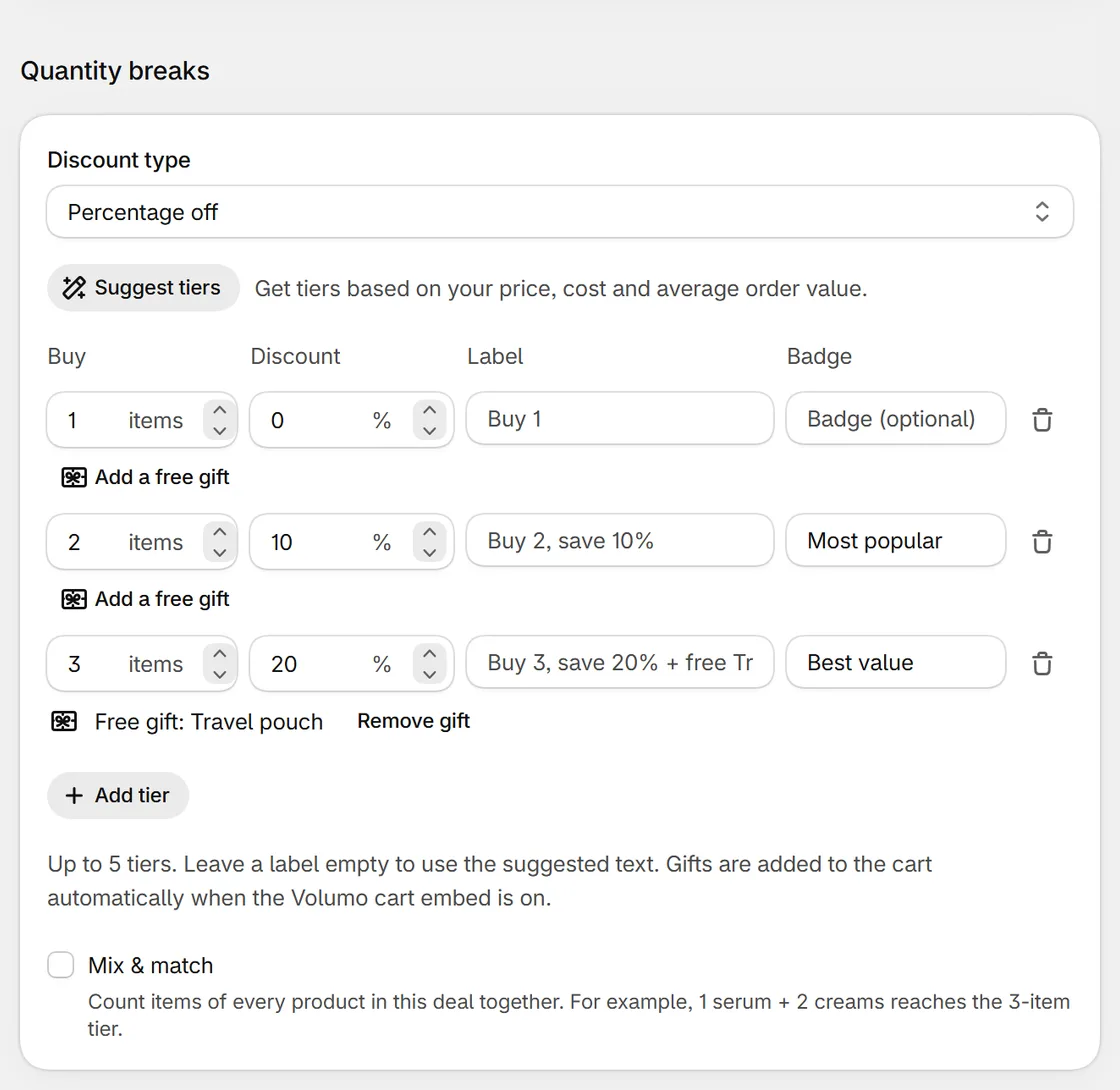
Then add the block to your product page, once:
- On Volumo’s home page, under App block and discount, click Enable next to App block. The theme editor opens on a product page.
- In the product section, click Add block > Apps > Volumo offers.
- Drag the block above the Add to cart button and click Save.
Here’s what shoppers see. Picking a tier changes the quantity, and changing the quantity picks the matching tier:
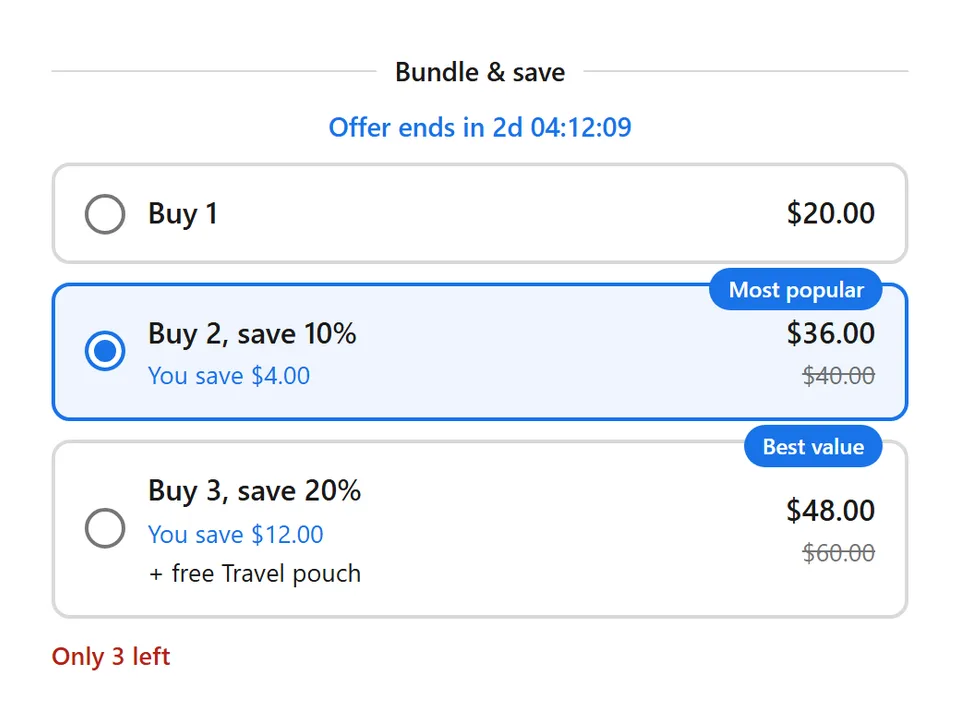
The discount itself runs on Shopify Functions, Shopify’s own discount engine. Nothing to type, and it applies the same way through the cart, Buy it now and express checkout.

Volumo by Centubo. Quantity breaks, buy X get Y, bundles and free gifts on your product pages, applied automatically at checkout. Free during launch.
Install on ShopifyMake the “add 1 more” moment happen
Most of the extra items come from the cart, not the product page. Turn on the Volumo cart embed (Volumo home > Turn on next to the cart embed, then Save in the theme editor). The cart then shows “Add 1 more to get Buy 3, save 20%” until the shopper reaches the top tier.
Three things that make tiers work better
- Pre-select tier 2. In the deal’s Appearance settings, choose which tier is selected when the page opens. Starting on “Buy 2” is the single change most likely to raise your average order, because shoppers have to actively choose less.
- Use real end dates only. A countdown with a real end date tells people the deal won’t last. A timer that resets every visit is a lie people notice. Volumo only shows a countdown when the deal has an end date.
- Test, don’t guess. Volumo’s A/B test shows a second set of tiers to half your visitors and tells you which one converts better once the result is clear. Give it a couple of weeks of normal traffic.
Where quantity breaks don’t fit
- Products people only need one of, like a mattress or a coat. A bundle with a related product works better.
- Very thin margins. If you earn $3 per item, even 10% off hurts. Consider a free gift on the top tier instead: a $2 gift feels bigger than a $2 discount.
- Stores where most orders are already 3+ items. You’d mostly be discounting orders you already get. Check your average items per order in Shopify Analytics first.
Questions people ask
Can Shopify do quantity breaks without an app?
Partly. You can create one automatic "Amount off products" discount per tier with a minimum quantity, and Shopify gives each item the best discount it qualifies for. What you don't get is the tier table on the product page or an "add 1 more" nudge in the cart, so most shoppers never learn the deal exists.
Do different variants count toward the same tier?
In Volumo, yes. Two blue and one red of the same product count as 3. To count different products together (1 serum + 2 creams), turn on Mix & match in the deal.
How many tiers should I offer?
Two or three. Buy 1, Buy 2 and Buy 3 covers almost every case. More tiers make the block taller and the choice harder, and the extra tiers rarely get picked.
Will quantity breaks stack with my discount codes?
That depends on your discount combination settings in Shopify. In Volumo's settings you choose whether its discount combines with product, order and shipping discounts.