
On this page
Shopify has Buy X get Y built in: Discounts > Create discount > Buy X get Y. It works at checkout, but it doesn’t add the free item to the cart and doesn’t show the offer on your product page, so many shoppers never use it. If the offer matters, show it on the product page with a button that adds both items at once.
BOGO vs a plain percentage: what it costs you
“Buy one get one free” sounds like 50% off, and on two identical items it is. Worked example with a $30 item that costs you $11:
| Offer | Shopper pays | Your cost | Profit | Items sold |
|---|---|---|---|---|
| Buy 1, full price | $30 | $11 | $19 | 1 |
| Buy 1 get 1 free | $30 | $22 | $8 | 2 |
| Buy 2 get 1 free | $60 | $33 | $27 | 3 |
| 20% off one item | $24 | $11 | $13 | 1 |
BOGO free on a high-cost product is expensive: $8 profit for two items shipped. Buy 2 get 1 free is the friendlier version for your margin, and buy X, get a cheaper item free (a $30 serum with a $4-cost pouch) is friendlier still. Pick the version that still pays before you pick the wording.
The built-in way
- Go to Discounts > Create discount > Buy X get Y.
- Choose Automatic discount so nobody needs a code.
- Under Customer buys, set the minimum quantity (for example 2) and the products or collections.
- Under Customer gets, set the quantity (1), the item, and Free (or a percentage).
- Set Maximum number of uses per order if you want to stop “buy 20, get 10 free”.
- Check Combinations and the dates, then save.
Then test it as a shopper. You’ll see the catch: add two items and nothing happens. The discount only appears once the third item is in the cart, and nothing tells the shopper to add it. You have to say it yourself, in the product description, a banner or an email.
Show the offer where people decide
Volumo is our app, so weigh this accordingly. A Buy X get Y deal in Volumo shows the offer on the product page with the price after the discount, and applies the discount at checkout through Shopify Functions.
There are two kinds:
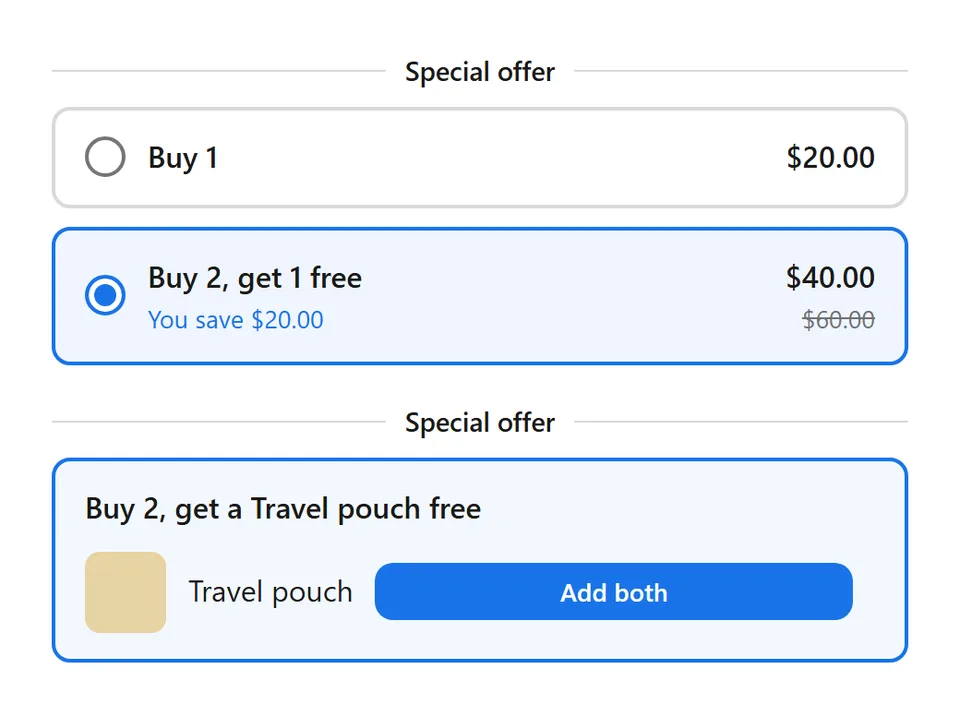
- More of the same product (buy 2, get 1 free). The block shows “Buy 1” and the full set with its price. Picking the set changes the quantity to 3.
- Specific products (buy a serum, get a pouch). The block shows up to 3 products to get, each with an Add both button that puts both items in the cart at once.
- In Volumo, click Create deal and choose Buy X, get Y.
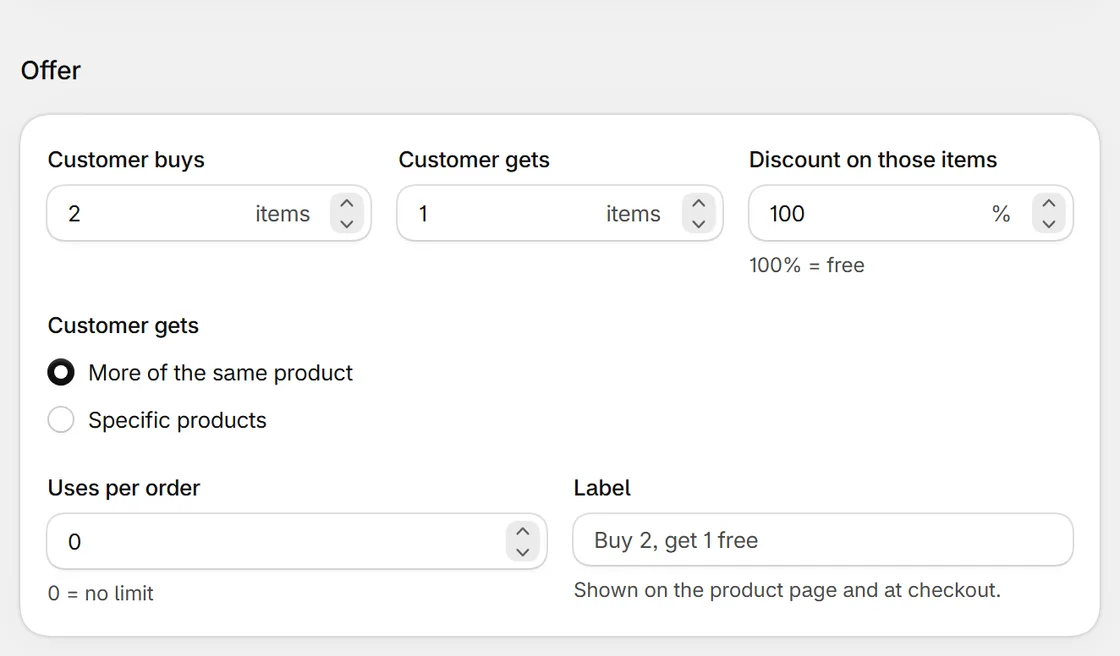
- Set how many items the shopper must buy, and pick the products under Customer buys from.
- Under Customer gets, choose More of the same product or Specific products and pick them with Browse products.
- Set the discount (Free, or a percentage) and Uses per order.
- Save, set the deal to Active, and make sure the Volumo block is on your product page.

Volumo by Centubo. Buy X get Y with an Add both button, quantity breaks, bundles and free gifts, applied at checkout. Free during launch.
Install on ShopifyThings that go wrong with BOGO
- Free item out of stock. The offer still shows, and shoppers get annoyed at checkout. Use a product you keep plenty of, or end the deal when it runs low.
- Unlimited uses. “Buy 1 get 1” on a 10-pack order gives away 5 items. Set uses per order to 1 or 2 unless you mean otherwise.
- Stacking. A BOGO that combines with a 20% sitewide code can push an order below cost. Check combinations on both discounts.
- Returns. Decide in advance what happens if someone returns the paid item and keeps the free one. Write it in your refund policy.
Questions people ask
Does Shopify add the free item to the cart automatically?
No. With Shopify's Buy X get Y discount the shopper has to add the "get" item themselves; then the discount applies at checkout. That's why so many BOGO offers get few redemptions.
Is "buy 2 get 1 free" the same as 33% off?
On three identical items, yes, the shopper pays for two out of three, which is 33% off each. The difference is psychological and practical. "Free" reads stronger than 33%, and the offer only triggers at three items, while 33% off works on one.
Can the free item be a different product?
Yes, both in Shopify's discount and in Volumo. A common one is "buy a serum, get the travel pouch free". Make sure the free item is something you have plenty of.
How do I stop BOGO combining with my other discounts?
Use the combination settings on each discount in Shopify. A BOGO usually shouldn't combine with other product discounts, or a shopper can stack it with a sitewide sale.