
On this page
On any Shopify plan, add the question to the Thank you page with a post-purchase survey app. You can’t put it on the checkout steps before payment unless you’re on Shopify Plus, and after payment is the better moment anyway. Keep it to one tap, tag the order with the answer, and compare channels by sales, not just by number of answers.
Why ask at all, when you have analytics
Your analytics see clicks. They don’t see the friend who mentioned you over dinner, the podcast host who read your name, or the TikTok someone watched on Tuesday before searching your brand on Friday. Those buyers show up as “direct” or “Google search”, and the channel that actually brought them gets no credit.
Asking the buyer is crude and it’s also the only method that catches those channels. It doesn’t replace your pixels. It fills in the parts they can’t see.
Where the question can go
| Place | Plan needed | Good for |
|---|---|---|
| Information, shipping or payment step of checkout | Shopify Plus | Rarely worth it: it’s a hurdle before payment |
| Thank you page, right after the order | Every plan | The main spot. Buyers just paid and the page is quiet |
| Order status page | Every plan | Second chance for buyers who skipped the Thank you page |
| Email a few days later | Every plan | Longer surveys, but far fewer people answer |
| Notes field in the cart | Every plan | Free, but it’s an open text box: answers are messy and hard to count |
Set it up with HearAbout
HearAbout is our app (it has Shopify’s Built for Shopify badge). The setup takes about five minutes.
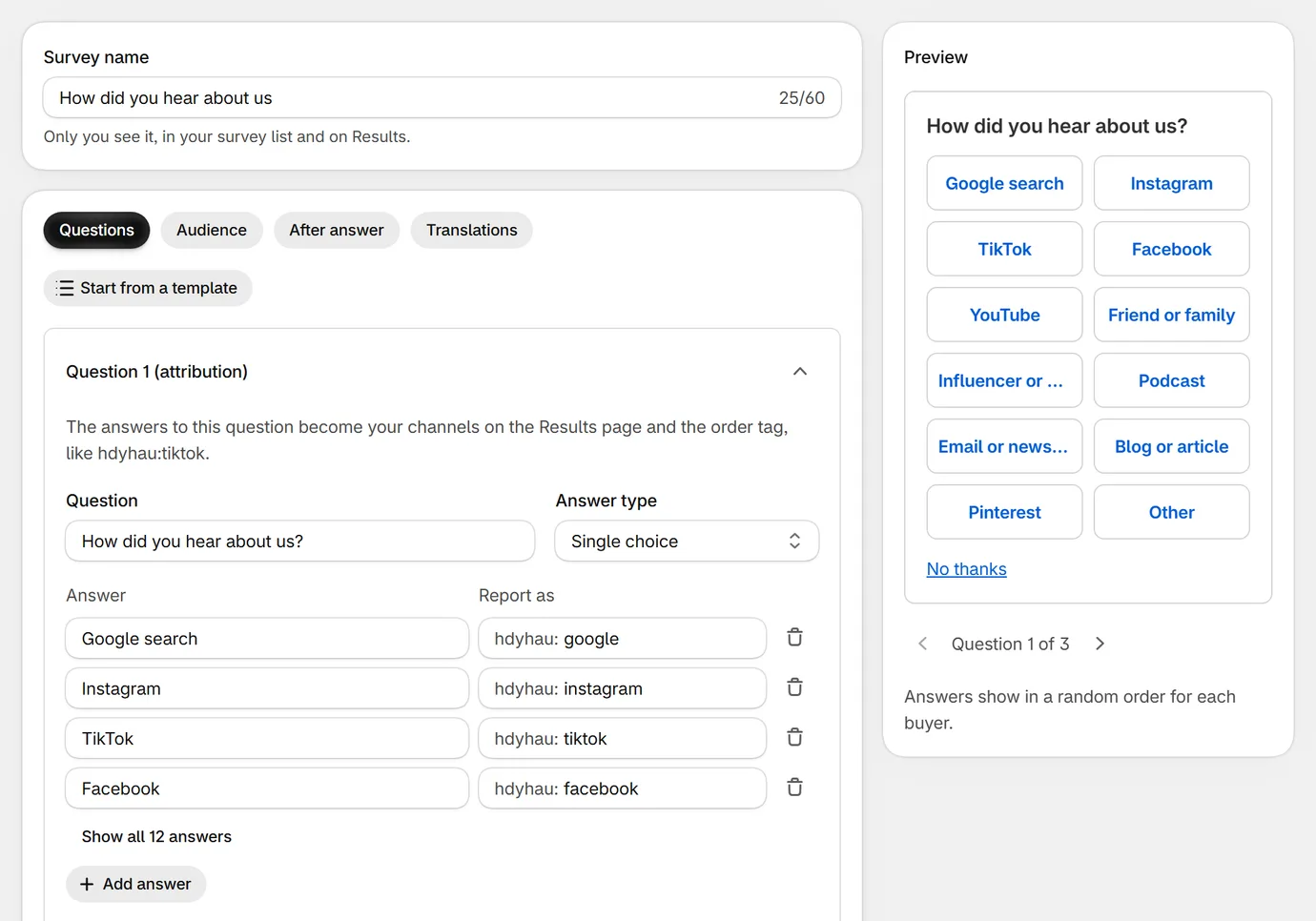
- Install HearAbout and open Surveys. Your first survey is ready as a draft with “How did you hear about us?” and 12 channels.
- Open it. Rename, remove or add answers (up to 15) and drag them into order. Keep Show answers in random order on, so the first answer doesn’t win by default. “Other” always stays last and lets buyers type their own.
- Check the thank-you message in the After answer tab.
- Click Save, then Run survey.
- On the HearAbout home page, click Set up next to “Add it to your Thank you page”. The checkout editor opens on the Thank you page.
- Click Add app block, choose HearAbout survey, drag it under the order confirmation and click Save.
Buyers see one question with tap-to-answer buttons, right under their order confirmation. “No thanks” closes it for that visit.
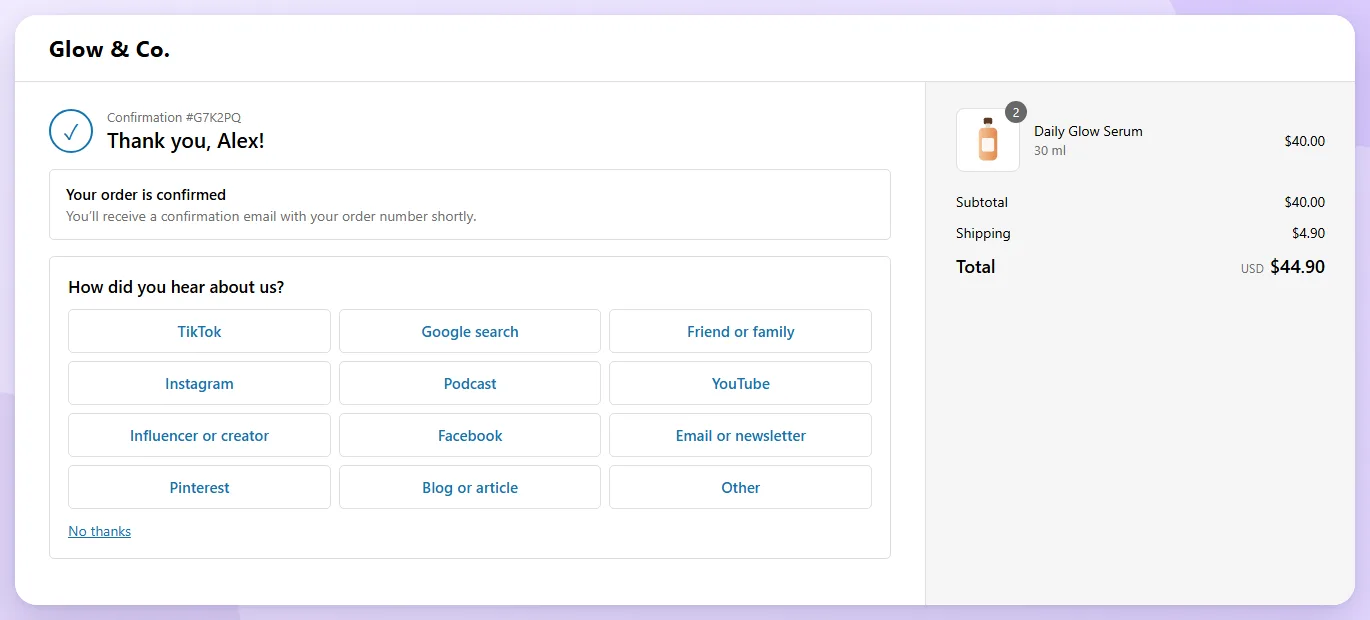
Then add the same block to the Order status page (pick it in the page picker at the top of the checkout editor), for buyers who closed the Thank you page too fast.
Choose your answers carefully
The answer list decides what you’ll learn. A few things we’ve learned from setting these up:
- Use the names buyers use. “Instagram” beats “Meta paid social”. Buyers don’t know what an ad network is.
- Split the channels you spend on. If you pay creators, “Influencer or creator” should be its own answer, not lumped into “Social media”.
- Keep it under about 12. A long list on a phone is a wall of buttons. Merge small channels into “Other” and read the typed answers.
- Add “Friend or family”. In many stores it’s a top answer, and it’s the one no ad dashboard can show you.
Each answer has a report key (like tiktok) that becomes the order tag: hdyhau:tiktok. If you change the survey later, keep the same keys so your tags stay consistent over time.
Read the results by sales, not by count
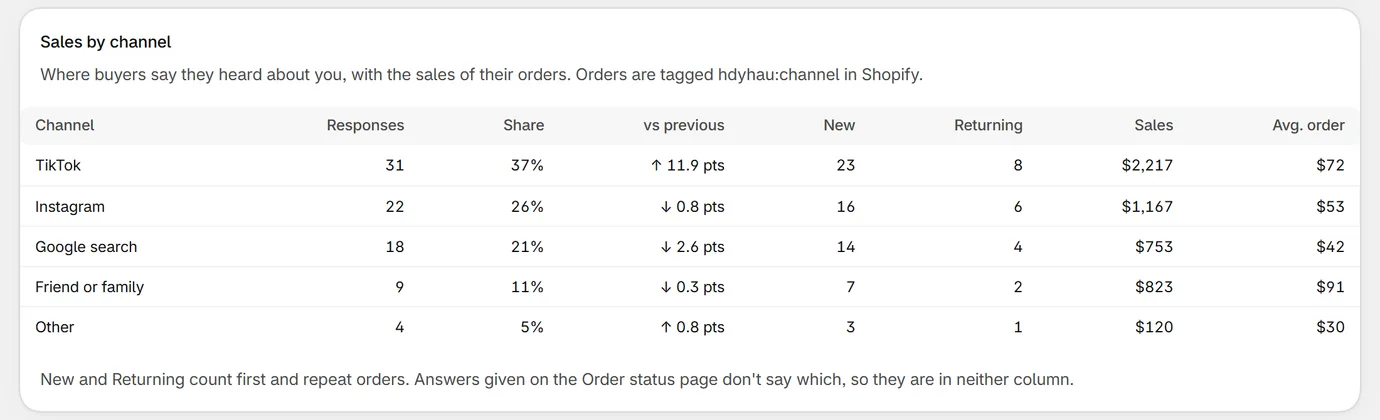
In the example above, Friend or family brings 11% of answers but the biggest orders. If you only counted answers you’d never notice. Look at three numbers per channel: share of answers, sales, and average order. Then compare new and returning buyers.
HearAbout by Centubo. A one-tap “How did you hear about us?” on the Thank you page, order tags, and sales by channel. Free during launch.
Install on ShopifyTest it
- Place a test order (on a development store, use Shopify’s Bogus Gateway).
- On the Thank you page, tap an answer. You should see your thank-you message.
- Open the order in your admin. After a short delay it has the tag
hdyhau:<channel>. - In HearAbout, open Results. The response appears with its channel and the order’s sales.
Questions people ask
Can I add a "How did you hear about us?" field to Shopify checkout without Plus?
Not on the checkout steps themselves. Custom blocks on the information, shipping and payment steps need Shopify Plus. The Thank you and Order status pages accept app blocks on every plan, which is where post-purchase surveys go.
Isn't asking before payment better?
Not usually. A required question before payment is one more reason to abandon checkout. After payment, the order is safe and buyers are in a good mood, so the question costs you nothing.
Where do I see the answers in Shopify?
HearAbout tags each answered order, for example hdyhau:tiktok. In Orders, filter by that tag. The answers are also saved on the order in a metafield, and the HearAbout Results page shows responses and sales per channel.
What if buyers close the page without answering?
Add the same survey block to the Order status page. Buyers who come back to check their order can answer then. Orders that already have an answer don't see it again.