
On this page
Shopify only lets you turn cash on delivery on or off for the whole store. To hide it for some orders (above $200, outside your country, for fragile products) you need a payment rule from an app. It runs inside checkout on every plan, no Plus needed. Match the method by the exact name buyers see, then test with a real checkout.
Cash on delivery sells. In plenty of markets it’s how people prefer to pay. It also has a cost nobody shows you on the payments page: parcels that come back.
What one refused COD order costs
Here’s a worked example for a $64 order that the buyer refuses at the door. Your numbers will differ, but the shape is the same:
If your gross margin per order is around $20, one refusal wipes out most of the profit from the order before it. That’s why the usual rules are “no COD above an amount” and “no COD where returns are slow or expensive”.
What you can do in Shopify on its own
In Settings > Payments, cash on delivery is a manual payment method. You can add it, rename it, add instructions, or remove it. There’s no setting for “only under $200” or “only in Spain”.
Hide COD on large orders with OrderCap
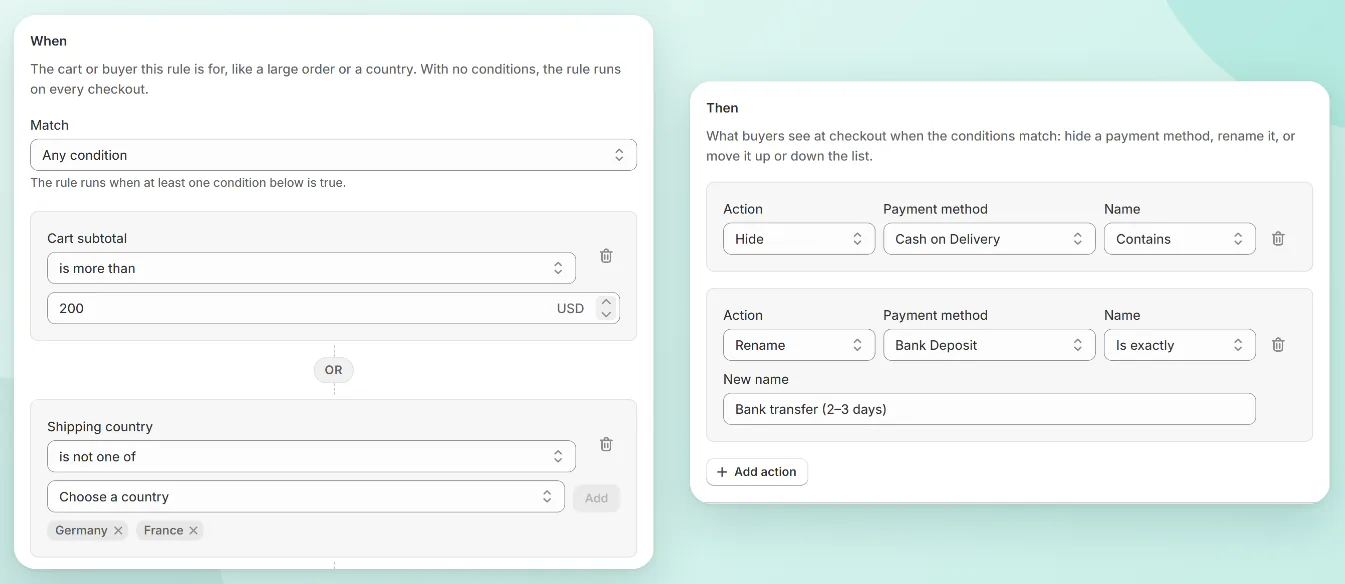
This is our app, so weigh the recommendation accordingly. The rule below hides COD when the cart subtotal is over $200, or when the order ships outside the countries you deliver to yourself.
- In OrderCap, click Create rule and pick the Hide COD on large orders template.
- Under When, the template already has Cart subtotal is more than. Enter your amount, for example 200.
- Optional: click to add a second condition, Shipping country is not one of, and add the countries where you don’t want COD.
- Set Match to Any condition if either one should hide COD, or All conditions if both must be true.
- Under Then, the action is Hide, payment method Cash on Delivery, name Contains. Keep Contains unless two methods share the words.
- Click Save. Payment rules apply at checkout within a few seconds.
Rename and reorder while you’re there
The same rule can rename a method or move it up the list. Two that help:
- Rename “Bank Deposit” to something that sets expectations, like “Bank transfer (2–3 days)”.
- Move the method you’d most like people to use (say, PayPal or cards) to the top. Buyers often pick the first option that works.
Rules run in the order of the Rules page. If two rules touch the same method, the later one sees the result of the earlier one, so use the arrows on the Rules page to put them in the order you mean.
Check it before your buyers do
Payment rules fail quietly: if the name doesn’t match, COD simply stays. So check two ways.
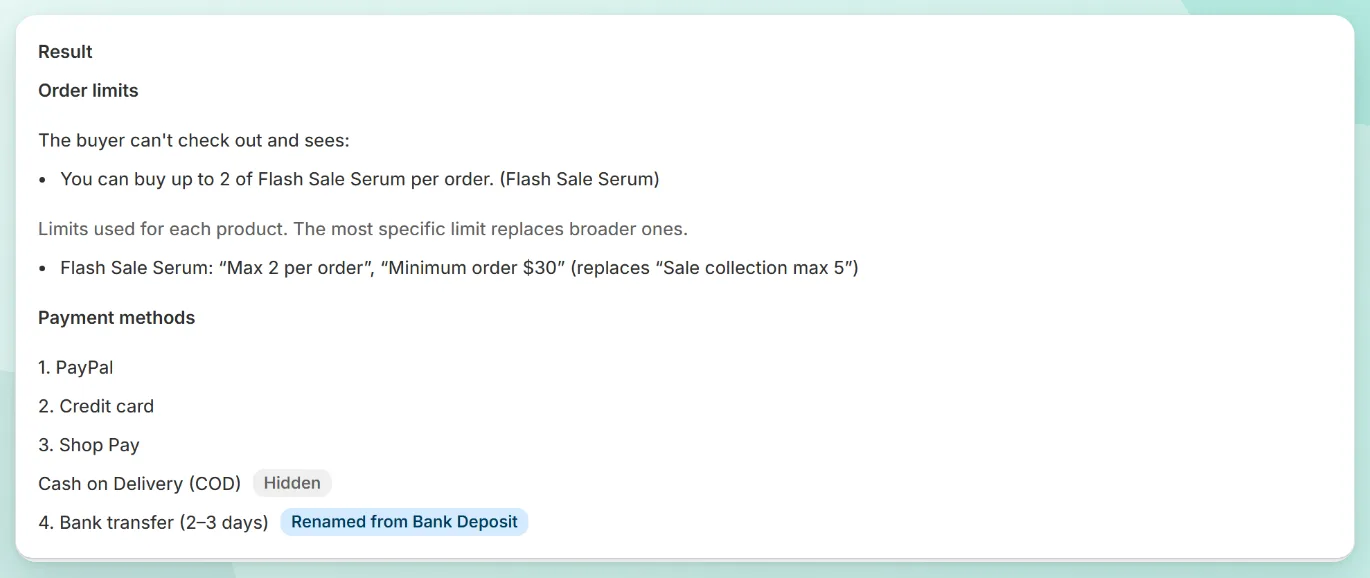
In the simulator. Build a cart over your amount, choose a shipping country, list your payment methods as they appear at checkout, and run the test. You’ll see which methods remain, which are hidden and which were renamed.
At a real checkout. Place two test orders: one under the amount (COD should be there) and one over it (COD should be gone). On a development store, Shopify’s Bogus Gateway lets you finish the order without a real card.
Common rules stores use
| Rule | Conditions | Why |
|---|---|---|
| No COD on big orders | Cart subtotal is more than $150–$300 | Refusals cost more on expensive parcels |
| COD only at home | Shipping country is not one of (your country) | Cross-border returns are slow and costly |
| No COD for made-to-order items | Products in the cart include (collection) | You can’t resell a personalized item |
| No COD after a refusal | Customer tags include no-cod |
Tag a customer once a parcel comes back |
| PayPal first | No conditions, action Move | Nudges buyers to a prepaid method |

OrderCap by Centubo. Hide, rename or reorder payment methods by order value, country, products or customer tags. Order limits included. Free during launch.
Install on ShopifyWhat a payment rule can’t do
- It can’t see the buyer’s history on its own. “Hide COD for people who refused before” needs a customer tag. Add the tag yourself after a refusal (or with Shopify Flow), and make the rule check for it.
- Express buttons on the product page (Shop Pay, PayPal, Google Pay) are prepaid, so they never offer COD anyway.
Questions people ask
Can I hide cash on delivery on Shopify without an app?
Not by conditions. In Settings > Payments you can turn COD on or off for the whole store, and that's it. Hiding it only for some orders (above an amount, for some countries or products) needs an app that uses Shopify's payment customization Functions.
Do I need Shopify Plus to hide payment methods?
No. Payment customization Functions from public apps work on every Shopify plan. The old Plus-only way was Shopify Scripts, which Shopify is replacing with Functions.
Why didn't my rule hide COD?
Usually the name doesn't match. Rules match the payment method by the name buyers see at checkout. If your method is called "Cash on Delivery (COD)", a rule for "Is exactly Cash on Delivery" won't match; use "Contains Cash on Delivery" instead.
Can I add a fee for cash on delivery?
Shopify checkout doesn't let you add a fee per payment method on most plans. Common workarounds use a fee product, and they're clumsy. We'd rather hide COD where it loses money than try to charge for it.